






Last Updated: October 23, 2026
Quick Summary
How to connect fish finder to chartplotter depends on which connection standard both units support: NMEA 2000, Ethernet, or NMEA 0183. Verify compatibility first, plan your cable routing, install the transducer, wire power and ground connections safely, then configure network settings on your chartplotter to detect the fish finder.
- Most modern fish finders and chartplotters use NMEA 2000, Ethernet, or NMEA 0183 connection standards.
- Install an inline fuse within 18 inches of the battery, sized to match your fish finder's maximum current draw.
- Route cables away from engine compartments and high-heat areas to prevent electrical interference with sonar signals.
- Power on your chartplotter first, then your fish finder, and wait 30 seconds for both units to boot before testing.
- Check that terminator plugs are installed at both ends of NMEA 2000 backbones or the network won't function.
Table of Contents
- What You'll Need Before Connecting Fish Finder to Chartplotter
- Step 1: Verify Fish Finder Chartplotter Compatibility
- Step 2: Choose Your Connection Method
- Step 3: Plan Your Cable Routing and Power
- Step 4: Install and Connect the Transducer
- Step 5: Wire Power and Ground Connections
- Step 6: Configure Network Settings and Test
- Troubleshooting: Chartplotter Not Detecting Fish Finder
- Frequently Asked Questions
What You'll Need Before Connecting Fish Finder to Chartplotter
Connecting a fish finder to a chartplotter transforms your boat's navigation and sonar capabilities into a unified system. But before you start running cables and powering up your marine electronics, you need to confirm compatibility and gather the right tools. This guide walks you through every step of how to connect fish finder to chartplotter safely and effectively.
Checking Fish Finder and Chartplotter Compatibility
Your fish finder and chartplotter must speak the same language to work together. Most modern units use one of three connection standards: NMEA 2000, Ethernet, or NMEA 0183. Check your equipment manuals to see which protocols both devices support. If they don't share at least one common standard, they won't communicate.
Beyond protocol compatibility, verify that both units are designed to share data. Some fish finders only transmit sonar signals. Others can also receive waypoints and routes from your chartplotter. Similarly, not all chartplotters can display live sonar data from a fish finder. Look for terms like "sonar source," "data sharing," or "device pairing" in your manuals.
Voltage compatibility matters too. Most marine electronics run on 12-volt systems, but some larger boats use 24-volt setups. Mixing voltages will damage equipment. Check the power specifications on both units and make sure they match your boat's electrical system.
Required Tools and Materials
Gather these items before you begin:
- Wire strippers and crimpers for marine-grade connectors
- Inline fuse and fuse holder (10-20 amp, depending on your fish finder's power draw)
- Marine-grade sealant or silicone caulk for drilling holes
- Network cable (Ethernet or NMEA 2000 backbone cable, depending on your connection type)
- Power wire and ground wire (14-gauge or 12-gauge, marine-rated)
- Mounting brackets and stainless steel fasteners
- Drill with marine-grade bits
- Multimeter to test voltage and continuity
- Cable ties and conduit for routing wires
Having everything on hand prevents mid-installation trips to the hardware store and keeps your work organized.
Step 1: Verify Fish Finder Chartplotter Compatibility
Start by confirming that your specific fish finder and chartplotter models can actually connect. Visit the manufacturer websites or call their support lines. Ask directly: "Can this fish finder send sonar data to this chartplotter?" Don't assume compatibility based on brand alone.
Write down the exact connection methods each device supports. Your fish finder might offer NMEA 2000, Ethernet, and NMEA 0183 options. Your chartplotter might only support NMEA 2000 and Ethernet. The overlap is your connection method.
Check whether your fish finder can act as a sonar source and whether your chartplotter can display that sonar data on its screen. Some combinations support one-way data flow (sonar to chartplotter only).
Voltage and amperage matter. If your fish finder draws 10 amps and your boat's accessory circuit maxes out at 15 amps, you'll overload the circuit if you add other devices later. Plan for growth.
Step 2: Choose Your Connection Method
How to connect fish finder to chartplotter depends on which standard both units support. Each method has different cable requirements and installation complexity.
NMEA 2000 Fish Finder Connection
NMEA 2000 is the modern marine standard. It uses a backbone cable that looks like a thick network wire. Your fish finder and chartplotter both plug into this backbone using T-connectors. The backbone requires a terminator plug at each end to complete the circuit.
NMEA 2000 advantages: faster data transfer, supports multiple devices on one network, cleaner wiring. You can add GPS units, autopilots, and other electronics to the same backbone without running separate cables.
To set up NMEA 2000, you'll run the backbone cable from your fish finder to your chartplotter. Install T-connectors at each device. Secure the terminator plugs at both ends of the backbone. The whole network must be properly terminated or devices won't communicate.
Ethernet Connection Fish Finder to Chartplotter
Ethernet offers high-speed data transfer and works well for modern fish finders and chartplotters designed for network integration. You'll run a standard marine-grade Ethernet cable between the two units.
Ethernet connections are straightforward but require a direct cable run from fish finder to chartplotter. You can't branch off to other devices the way you can with NMEA 2000. If you add a third device later, you'll need to reconfigure your network.
The cable routing is simpler than NMEA 2000 because you're only connecting two devices. Ethernet also tends to be faster, which matters if you're streaming high-resolution sonar data.
NMEA 0183 Connection
NMEA 0183 is the older standard. It uses simpler wiring but slower data rates. If your fish finder and chartplotter both support NMEA 0183 but not the newer standards, this connection will work, though it won't be as fast.
NMEA 0183 uses a serial connection with dedicated transmit and receive wires. The setup is more manual than NMEA 2000 or Ethernet. Configuration requires more attention to wiring polarity and device settings.
Most newer fish finders and chartplotters have moved away from NMEA 0183, but if your equipment is older or budget-oriented, this may be your only option.
Step 3: Plan Your Cable Routing and Power
Before drilling any holes, plan your cable path from the fish finder to the chartplotter. Measure the distance. Account for the transducer cable coming from the transom or through-hull mounting point.
Route cables away from engine compartments, fuel lines, and high-heat areas. Electrical interference from engines can corrupt sonar signals. Use cable conduit to protect wires from chafing and UV damage. Marine-grade conduit rated for saltwater environments is recommended.
Identify where you'll mount the inline fuse. It should be within 18 inches of the battery or power source. The fuse protects your entire system if a wire shorts out.
Plan your ground connection carefully. Ground wires must run to a clean, unpainted part of your boat's electrical system or directly to the negative battery terminal. Poor grounding causes signal noise and intermittent connections.
Sketch your cable routing on paper. This prevents mistakes and makes troubleshooting easier later if something doesn't work.
Step 4: Install and Connect the Transducer
The transducer sends sonar signals into the water and receives echoes back. Its location and mounting directly affect sonar quality. Most transducers mount on the transom (the flat back of your boat) or through the hull below the waterline.
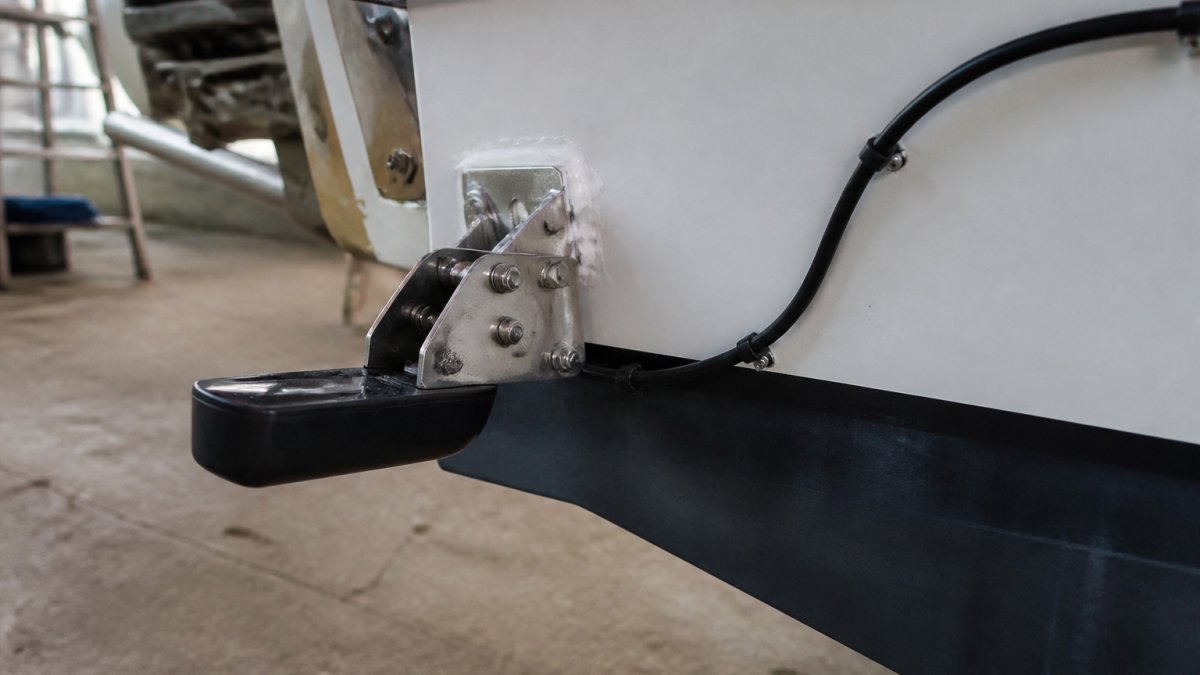
For transom mounting, drill a hole slightly larger than the transducer cable. Install the mounting bracket with stainless steel fasteners. Apply marine-grade sealant around the hole to prevent water intrusion. Let the sealant cure fully before launching.
Route the transducer cable along the hull toward your fish finder. Use cable ties to secure it every 12-18 inches. Keep the cable away from engine exhaust and sharp edges. Protect it with conduit if it runs through high-traffic areas.
Connect the transducer cable to your fish finder. Most fish finders have a dedicated transducer port. Push the connector firmly until it clicks. A loose connection will cause sonar dropouts and false readings.
Step 5: Wire Power and Ground Connections
Power and ground wiring is where electrical safety matters most. A poor connection here can start a fire or damage your entire electrical system.
Run a dedicated power wire from your boat's battery to the fish finder. Use marine-rated wire sized for the current draw. Don't undersized the wire, as it could overheat.
Install an inline fuse within 18 inches of the battery. The fuse rating should match your fish finder's maximum current draw. A 10-amp fish finder gets a 10-amp fuse.
Connect the ground wire directly to the negative battery terminal or to a clean, unpainted part of your boat's electrical system.
Use marine-grade connectors rated for saltwater environments. Solder all connections and cover them with heat-shrink tubing. Crimp connectors may corrode in a marine environment.
Test all connections with a multimeter before powering on your fish finder. Check for proper voltage at the power connector. Verify continuity on the ground wire.
Step 6: Configure Network Settings and Test
Power on your chartplotter first. Then power on your fish finder. Wait 30 seconds for both units to boot.
On your chartplotter, navigate to the network or device settings menu. Look for an option to add a new sonar source or connect to a fish finder.
Select your fish finder from the list of available devices. The chartplotter should detect it automatically if the physical connection is solid and both units are using the same protocol.
Once connected, your chartplotter should display sonar data from the fish finder. Test the sonar by pointing the transducer into the water.
Check that waypoints and routes sync between devices. Create a test waypoint on your chartplotter and confirm it appears on your fish finder. This verifies two-way data sharing is working.
Monitor the display for 10-15 minutes during this initial test. Watch for signal dropouts, freezing, or garbled data.
Troubleshooting: Chartplotter Not Detecting Fish Finder
If your chartplotter doesn't detect your fish finder, work through these steps systematically.
First, confirm both units are powered on. Check that the power light is illuminated on each device.
Verify the physical cable connection. For Ethernet, confirm the network cable is fully inserted at both ends.
Check that the network is properly terminated.
Test voltage at the fish finder's power connector using a multimeter.
Restart both units. Power them off completely, wait 10 seconds, then power them back on.
Check your fish finder's network settings.
Verify that both units are configured for the same protocol.
If the cable run is very long, signal degradation might prevent connection.
Contact the fish finder and chartplotter manufacturers' support lines if you've worked through these steps and the connection still fails.
Connecting your fish finder to your chartplotter creates a powerful navigation and sonar system that transforms your fishing and boating experience.
Frequently Asked Questions
Can you connect any fish finder to any chartplotter?
Not always. Compatibility depends on the network protocol each device supports. Most modern fish finders and chartplotters use NMEA 2000, NMEA 0183, or Ethernet connections. Before purchasing, verify that both devices share at least one compatible connection method. Check the manufacturer specifications or contact support to confirm. Some older models may lack network capability entirely, making integration impossible without additional adapters.
What is the best way to set up NMEA 2000 fish finder connection?
NMEA 2000 fish finder connection uses a backbone cable with drop cables to each device. Install the backbone cable along your boat's main power run, secure it with cable clips every 12 inches, and connect the fish finder and chartplotter via T-connectors. Terminate each end of the backbone with a terminator plug. Ensure all connections are marine-grade and waterproofed. Power the network through a dedicated circuit with an inline fuse rated for your system's amperage. Test communication in your chartplotter's network settings menu.
Why is my chartplotter not detecting my fish finder?
Chartplotter not detecting fish finder usually stems from loose connections, incorrect network settings, or power issues. First, check that all cables are fully seated in their connectors and that the fish finder has power. Verify network settings match on both devices (baud rate, address, protocol). If using NMEA 2000, confirm the backbone cable is properly terminated at both ends and that no terminator plugs are missing. Test with a different cable if available. If the issue persists, verify compatibility and consider a factory reset on both units.
Do I need a special cable for Ethernet connection fish finder to chartplotter?
Yes, Ethernet connection fish finder to chartplotter requires marine-grade Cat5e or Cat6 Ethernet cable rated for wet environments. Standard computer Ethernet cables lack the shielding and corrosion resistance needed for saltwater or high-vibration boat environments. Use connectors rated IP67 or higher for waterproofing. Route the cable through conduit where possible to protect it from abrasion and UV damage. Some manufacturers provide proprietary connection kits, so verify your specific models before purchasing aftermarket cables.

