




Last Updated: October 28, 2026
Quick Summary
Choosing the right fish finder starts with your boat, not the spec sheet: define your hull length and type, your primary water, and how you fish, and those answers eliminate most of the market. Then match display size to your helm space, pick sonar views that fit your style, and confirm transducer compatibility before buying.
- Measure your helm or console opening before choosing display size, subtracting clearance for cables and brackets.
- CHIRP sonar shows two fish a few inches apart as distinct arches where fixed-frequency sonar shows one blob.
- Side imaging suits trolling or drifting structure, while down imaging is the more useful view for vertical jigging.
- Mount a transom transducer on the flat running surface, roughly 12 to 18 inches to the side of the propeller.
- Budget for the complete system price, including transducer, cabling, battery and wiring, not just the display.
Table of Contents
- Start With Your Boat, Not the Spec Sheet
- CHIRP Sonar vs Traditional Sonar: What the Difference Means on the Water
- Side Imaging vs Down Imaging: Picking the View That Fits Your Fishing
- Fish Finder With GPS and Chartplotter: When the Combo Is Worth It
- Fish Finder Transducer Installation and Compatibility
- Power Draw, Wiring, and Total Cost of Ownership
- Choosing a Fish Finder at Marine Electronics Depot
- Frequently Asked Questions
Start With Your Boat, Not the Spec Sheet
Choosing the right fish finder for your boat starts with the hull, not the catalog. A unit that's perfect on a 21-foot center console can be a liability on a 12-foot kayak, and the reverse is just as true.
Define three things first: your boat's length and hull type, your primary water (freshwater lakes, coastal saltwater, or ice), and how you fish (trolling, jigging, drifting, or sight fishing). Those three answers eliminate most of the market before you ever compare features.
A common mistake is buying for the boat you plan to own someday. Buy for the hull in your slip now.
| Boat Type | Typical Display Size | Mounting Approach | Key Priority |
|---|---|---|---|
| Kayak / inflatable | 4-7 inch | Portable, battery-powered | Weight and battery life |
| Small aluminum (under 16 ft) | 5-7 inch | Console or portable | Simplicity, shallow-water sonar |
| Center console (17-24 ft) | 7-9 inch | Flush or bracket mount | CHIRP plus GPS combo |
| Offshore / larger | 9-16 inch | Flush mount, networked | Side imaging, chartplotter integration |
For a broader look at matching electronics to hull size, see marine electronics for small boats.
Matching Display Size and Readability to Your Helm
Display size is a space problem before it's a feature. Measure your helm or console opening first, then subtract clearance for cables and brackets. A 9-inch screen that blocks your compass or throttle is worse than a 7-inch unit you can actually see.
Readability matters more than raw inches. Look for high display resolution, brightness rated for direct sunlight, and an LCD panel that holds contrast at an angle. On an open boat, glare kills cheap screens. If you fish standing at a tiller, a smaller, brighter display beats a large dim one every time.
CHIRP Sonar vs Traditional Sonar: What the Difference Means on the Water
CHIRP sonar sweeps a range of frequencies in each pulse, while traditional single- or dual-frequency sonar fires at fixed frequencies. The practical result: CHIRP returns sharper target separation and cleaner bottom detail, especially in deep water or when fish sit tight to structure.
Traditional 2D sonar still works, and on shallow flats it's often all you need. Where CHIRP earns its keep is target discrimination. Two fish a few inches apart show as one blob on a fixed-frequency return and as two distinct arches on CHIRP.
Frequency choice follows your water. The NOAA guidance on hydrographic surveying is a useful primer on how sound behaves in water if you want the underlying physics.
Side Imaging vs Down Imaging: Picking the View That Fits Your Fishing
Side imaging scans outward to port and starboard, painting a wide strip of bottom structure on either side of the boat. Down imaging looks straight below with a narrow, high-detail cone. They answer different questions, and most anglers eventually want both.
Side imaging shines when you're covering water: finding brush piles, ledges, and bait schools off to the sides before you ever cast. Down imaging wins when you're parked over a wreck or drop-off and need to see exactly what's beneath the transducer.
If you troll or drift structure, side imaging pays for itself. If you vertical jig, down imaging is the more useful view.
Fish Finder With GPS and Chartplotter: When the Combo Is Worth It
A fish finder with GPS and chartplotter combines sonar, position, and mapping in one unit. The combo is worth it the moment you fish unfamiliar water, mark waypoints, or run at night. Separate units cost less up front but clutter the helm and rarely share data cleanly.
The integration question matters most. If you're weighing a combo unit, here's how to connect a fish finder to a chartplotter before you commit.
For anglers who stay on one lake and never mark structure, a standalone sonar unit is the honest answer. For everyone else, the combo earns its place.
Fish Finder Transducer Installation and Compatibility
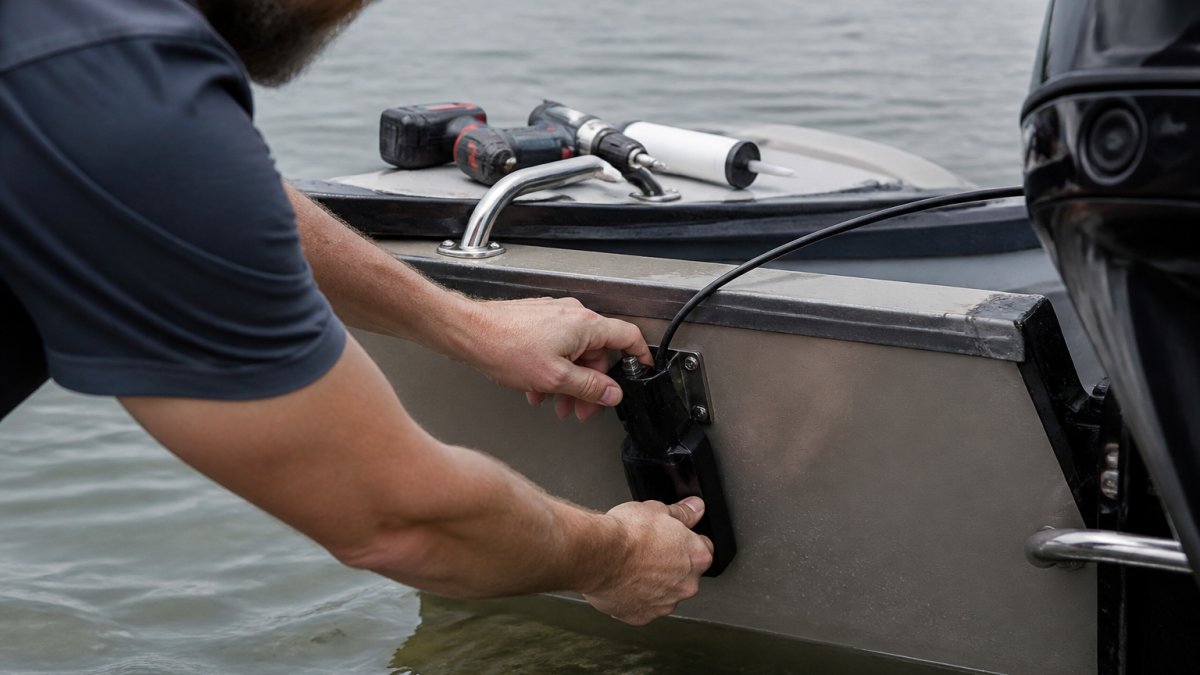
Transducer installation is where good units go bad. The transducer is the only part of the system that touches the water, and its mounting position, angle, and cable route determine whether you see clean sonar returns or a screen full of noise. Before you compare head units, confirm three things: the transducer matches the head unit's sonar type, the mount suits your hull, and the cable can reach the helm without picking up interference.
Transom, Trolling-Motor, and Through-Hull Mounts
Transom mount. The most common choice for trailer boats and aluminum hulls. It is affordable, replaceable, and easy to adjust. The trade-off is exposure to prop wash, trailer rollers, and debris.
Trolling-motor mount. Popular for bow fishing and kayaks because it keeps the transducer out of prop wash and aims it where you cast. It follows the motor's heading, so the sonar cone points where the boat is going rather than where it has been.
Through-hull and in-hull mount. Through-hull fittings drill into the hull and suit solid fiberglass boats that stay in the water.
Compatibility Checks Before You Buy
Compatibility runs both ways. The transducer must match the head unit's sonar type (traditional 2D, CHIRP, down imaging, side imaging, or live sonar), and the connector must match the port. Brands often use proprietary connectors, and a transducer from one brand rarely plugs into another without an adapter. Check the head unit's spec sheet for supported transducer part numbers, then confirm the transducer's frequency range and power rating fall within the head unit's limits. A high-power transducer on a low-power head unit wastes money; a low-power transducer on a high-power unit leaves performance on the table.
Cable Routing and Interference
Route the transducer cable away from the engine harness, bilge pump wiring, and VHF antenna cable. Parallel runs alongside power cables pick up electrical noise that shows as vertical streaks or a dark band on the screen. Cross other cables at right angles when you must cross them, and leave a drip loop before the cable enters the helm so water runs off rather than into the connector. Coil excess cable loosely; tight coils can act as an antenna for interference.
Common Installation Mistakes
- Mounting in line with strakes, rivets, or hull steps, which creates turbulence that ruins high-speed readings.
- Setting the transducer too high, so it loses bottom contact when the boat planes.
- Aiming the face too far forward or back, which tilts the sonar cone and distorts depth readings.
- Skipping sealant on screw holes, which lets water into the transom.
- Finalizing the position without a test run at speed. Test at idle, at cruise, and at wide-open throttle before you drill the final holes.
If you plan to network sonar, radar, and autopilot later, confirm the transducer and head unit support the same network standard before you mount anything.
Power Draw, Wiring, and Total Cost of Ownership
Power draw is the spec sheet line nobody reads until the battery dies mid-morning. Larger displays, side imaging, live sonar, and networked chartplotters pull more current than a basic 2D unit, and on a small boat with a single starting battery, that difference decides whether you make it back to the ramp. Plan the electrical side before you buy the head unit, not after.
Estimating Battery Demand
Fish finder manufacturers publish current draw in amps, usually at a stated voltage. To estimate amp-hours for a trip, multiply the unit's draw by the hours you run it. A unit drawing about 1 amp for 8 hours uses roughly 8 amp-hours; a larger networked display with side imaging can draw several times that. Add the draw of every device on the same battery: chartplotter, radar, livewell pump, bilge pump, and radio. Most practitioners find a dedicated house battery is the simplest way to keep electronics from stranding the engine battery.
Wiring, Fusing, and Interference
Use marine-grade tinned copper wire and size the gauge to the run length and current, not to what fits the connector. Long runs at small gauge drop voltage and cause the unit to reboot or dim. Protect every positive circuit with a fuse or breaker rated for the wire and the device, and confirm your fuse panel has a spare circuit before you buy. Run electronics power directly to the battery or a dedicated bus, not through the engine harness. Keep sonar and power cables separated, and bond the transducer cable shield as the manufacturer instructs to reduce noise.
Total Cost of Ownership
The head unit is only part of the bill. Budget for the transducer, mounting hardware, cabling, a network backbone if you run multiple displays, mapping subscriptions or chart cards, a house battery and wiring, and any adapters. A cheaper unit that needs three add-ons often costs more than a combo that includes them. When you compare units, compare the complete system price for your boat, not the shelf price of the display.
Choosing a Fish Finder at Marine Electronics Depot
We carry over 21,000 marine electronics products from more than 300 authorized brands. Every product ships with a full manufacturer warranty, orders placed before 4pm EST go out same day, and free shipping applies on orders over $75.
Not sure your head unit and transducer will talk to each other?
Frequently Asked Questions
What screen size should I get for a fish finder?
Screen size depends on your helm space and how you fish. A 5-inch display works for a small aluminum boat or kayak where space is tight, while 7- to 9-inch units give you room to split the screen between sonar and mapping. If you run side imaging or a GPS combo, go larger: 9 to 12 inches lets you read detail without squinting. Check that the unit fits your console before buying, and remember that resolution matters as much as size for readability in bright sun.
Is CHIRP sonar better than traditional sonar?
CHIRP sonar sends a swept range of frequencies instead of a single pulse. Traditional single- and dual-frequency sonar uses fixed frequencies.
What's better, side imaging or down imaging?
They answer different questions. Down imaging looks below the boat, while side imaging scans to port and starboard.
Do I need GPS and chartplotting on my fish finder?
A fish finder with GPS and chartplotter built in combines sonar, position, and mapping in one unit.
Can I install a fish finder on any boat?
The mounting method depends on the boat and transducer. Options include transom, trolling-motor, in-hull, and through-hull mounts.
How much power does a fish finder draw from my battery?
Check the unit's current-draw rating and manufacturer instructions before wiring.
The hardest part of choosing a fish finder isn't comparing specs, it's knowing which specs your boat can actually support. Marine Electronics Depot stocks authorized gear from 300+ brands, backs every unit with a full manufacturer warranty, and offers same-day shipping plus 30-day returns so you can get the right unit the first time. Get started with Marine Electronics Depot and rig your boat with electronics matched to how you actually fish.

